- 0.Intro.
- 1.Getting Started with C
- 2.Memory & Pointers
0. Intro
Q: How to learn (anything) efficiently?
- Be serious about it. –> This MATTERS !!!
- Understand –> Remember
- Multiple learning types
- Pictures
- Conversation
- Read out loud
- …
- WRITE A LOT OF CODE!!! –> Practice, Practice, Practice.
GCC (Gnu Compiler Collection)
- Collection: for multi programming lang.
- Compiler on Windows:
- Cygwin: Simulation of Unix environment, including gcc
- MinGW (Minimalist GNU for Windows): make programs work on Windows.
1. Getting Started with C
Features of C
- Low level
Advantages
- Speed
- Space
- Portability (Cross-platform, WOCA )
Three C standards
C standard library
stdio.h: Allow read/write data from/to terminal.
- puts(): Display a string on cmd prompt/terminal.
stdlib.h: eg. NULL, malloc(), rand(), atoi(), abs(), exit(), system() …
- atoi(): Convert string to int.
- Eg.
intVar = atoi(strVar); - sprintf(): Write formatted data to string.
- Eg.
charNum = sprintf(outStr, "Format String: %d, %s\n", intVar, inStr); - @[C] printf format
@Ref:
assert.h ctype.h errno.h float.h limits.h locale.h math.h setjmp.h signal.h stdarg.h stddef.h stdio.h stdlib.h string.h time.h
💥 Processes of C programs
Steps:
- source code: hello.c // c src code that should be preprocessed.
- +header.h
↓ Preprocessor
- +header.h
- expanded ~: hello.i // c src code that should not be preprocessed.
gcc -E hello.c -o hello.i//-E: Preprocess,compile
↓ Compiler
- assembly: hello.s // assembler code.
gcc -S hello.i -o hello.s//-S: Compilation,assemble
↓ Assembler
- Object: hello.o
gcc -c hello.s -o hello.o//-c: Compile, assemble,link
↓ Linker +(.lib .a)
- exe code: hello(.exe)
gcc hello.o -o hello(.exe)
↓ Loader +(.dll .so)
- Execute!
- 2~4: Build
- 5~6: Run
- Ref.
- Create a program – C – CodingMeta
- C Preprocessor directives
- 编译和调试C/C++程序常用到的一些知识点 - armsword的涅槃之地
- gcc man
- [Head First C, Chap4.]
- source code: hello.c // c src code that should be preprocessed.
Program start from main, and:
- return 0: success
- return others: false
- C99:
-std=c99, auto return- Eg.
gcc -std=c99 test.c -o test_program - @
-std=c99 -pedantic??
- Eg.
Cmd to check newest exit status:
- Linux/ Mac:
echo $? - Windows:
echo %ErrorLevel%
- Linux/ Mac:
Compile and run:
gcc test.c -o test && ./test
On Unix-style operating systems, programs are run only if you:- specify the directory(path)
- the directory is listed in the PATH environment variable.
.: current dir..: parent dir./specify the path of current directory
Control Statements
switch v.s. if-else
- switch: multi-check in same variable.
break;v.s.continue;
2. Memory & Pointers
- Pointers are just variables that store memory addresses.
💥 Memory Layout
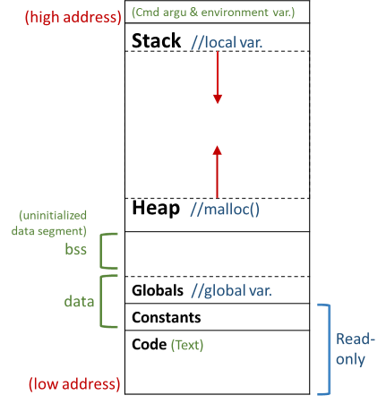
- Ref.
- Variable location
- Stack: local var. //address: high –> low; pop!
- Heap: malloc() //address: low –> high
- Globals: global var.
- Constants: const var. //string literal
char *card="JQK";(Read-only!!) - Code
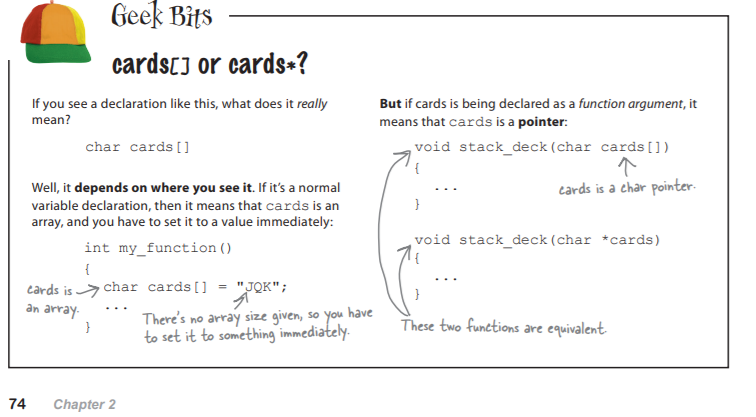
⭐️ Array v.s. Pointer
Pointer var.
&where: find address of a variable.*dereference: read/set contents of a memory address.
*array == array[0],*(array+2) == array[2]- No matter what data types they have!
- **Pointer variables have types so they can adjust pointer arithmetic.
Array variables can be used as pointers, but array variables are not quite the same…
Array Pointer Eg. char a[] = "How big is it?";char *p = a;1. sizeof() string/char array size
sizeof(a) = 15;4 or 8 bytes (32- or 64-bit)
sizeof(p) = 4 or 8;2. address &&a == a; &p: address of p variable 3. re-point
(when create, …)✖️
allocate space to store the arraya[];
but no space for array variablea✔️
allocate 4 or 8 bytes to store the ptr.- pointer decay: assign an array to a ptr (when passing to a function), ptr only contain address without the
size. (p59.)
- pointer decay: assign an array to a ptr (when passing to a function), ptr only contain address without the
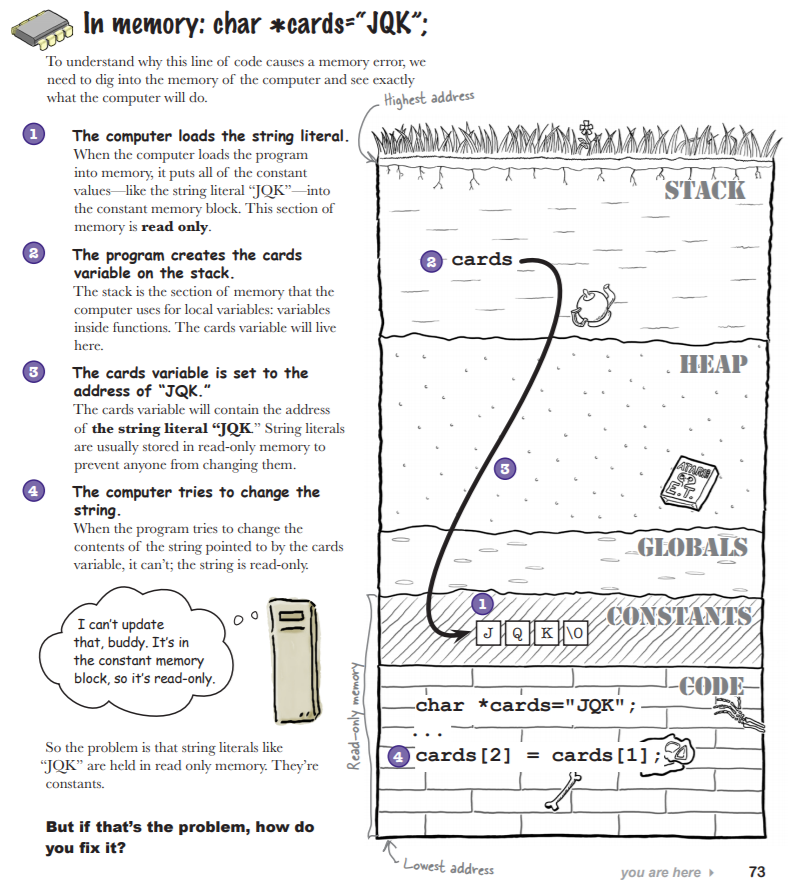
string literals v.s. char (Screenshot)
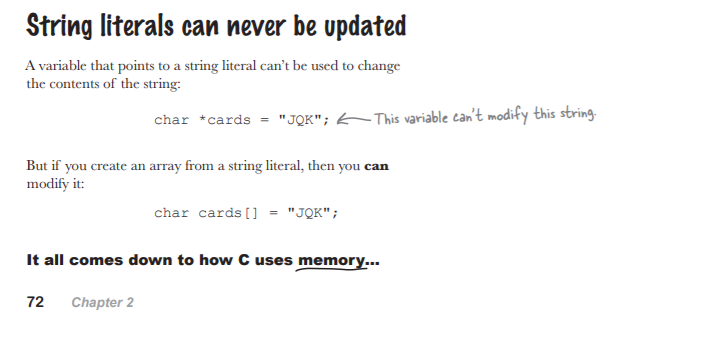
*string literals
- ptr (address) to string literals (constants).
- Can NOT be update.
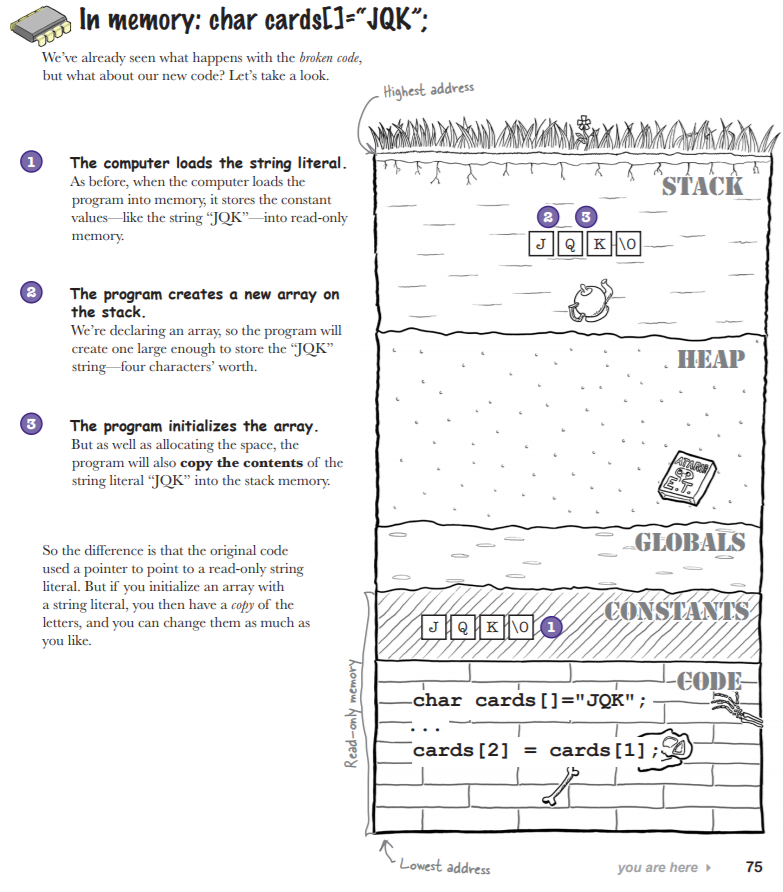
char array[]
- no space for the array variable, only allocate space to store the contents.
- copy string literals (const) to a new array to modify.
- array content can be modified.
Tips
- String literals are stored in read-only memory.
- If you want to modify a string, you need to make a copy in a new array.
- You can declare a char pointer as
const char *to prevent the code from using it to modify a string
⭐️ scanf() v.s. fgets()
| (p68.) | scanf() | fgets() |
|---|---|---|
| Usage | int scanf ( const char * format, ... ); |
char * fgets ( char * str, int num, FILE * stream ); |
Eg. char food[5]; |
scanf("%4s", food); //return value=1 |
fgets(food, sizeof(food), stdin); //sizeof(food)=5 |
| param. | %[*][width][length]specifiersimilar to @printf format |
[str]: ptr of char array [num]: max num [stream]: ptr of input FILE |
| return | [int]: #num of arguments successfully filled | [char*]: returns str. |
| 1. Safty(limit) | remember! | mandatory |
| 2. Multiple fields | ✔️ structured data, use [format] | ✖️ string buffer*1 |
| 3. Space in string | hit space, %s stops @Regular expression |
read whole string (terminate: newline/EOF) ❗️(and add newline, if it exist) |
| When to use which? | structured data | single unstructured string |
- Limit string’s length to prevent buffer overflows. (segmentation fault/ abort trap –> cause bugs. –> crash) (p66.)
gets(): Danger, don’t use.
@TODO
- (p56.) sizeof, size_t
- scanf (%[^\n])?? –> string?! https://www.studytonight.com/c/string-and-character-array.php
(p67.) function signature?? what is ~? https://www.quora.com/What-are-function-signatures-in-C-programming-language
[ ] head first C
- @argument v.s. parameter (?)
- @Kelly Criterion (?)
[ ] others
- @pragma